

Step 1
Log in to your Google Tag Manager account.
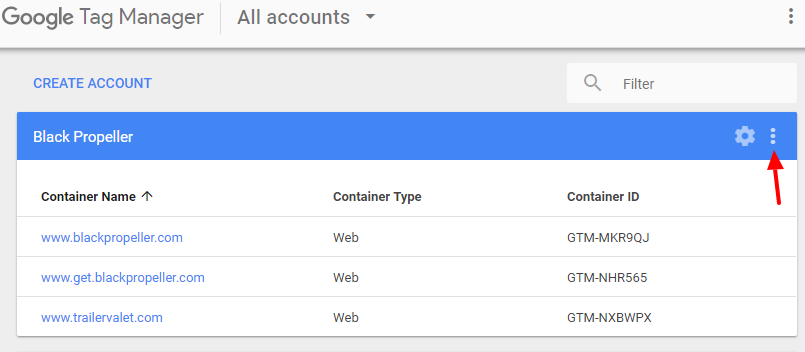
From the ACCOUNTS screen click the 3 vertical dots next to the gear icon within the blue banner. When the drop down menu appears, select User Management.
Step 2
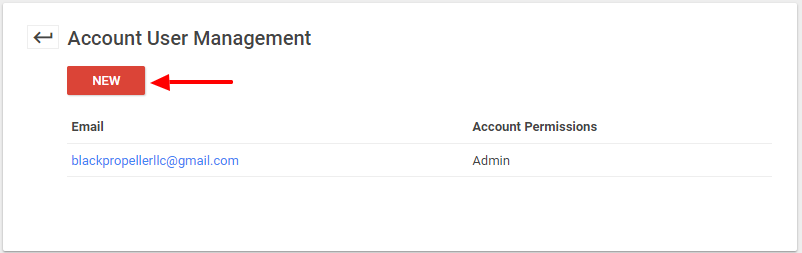
From the USER MANAGEMENT screen click the red NEW button.
Step 3
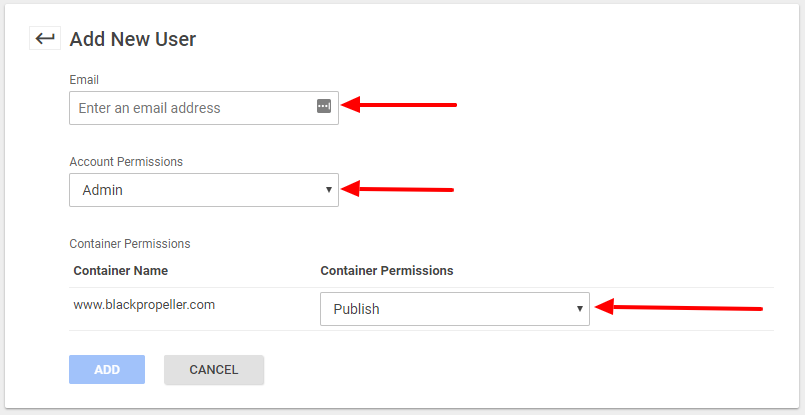
From the USER MANAGEMENT screen enter the email address of the user you wish to add in the email field. Then select Admin from the Account Permissions menu. Select Publish from the Container Permissions menu. Then click the blue add button.
That’s it! Your new user is now on their way to enjoying the many benefits of Google Tag Manager.
law
Berita Olahraga
Lowongan Kerja
Berita Terkini
Berita Terbaru
Berita Teknologi
Seputar Teknologi
Berita Politik
Resep Masakan
Pendidikan
Berita Olahraga
Berita Olahraga
News
Berita Terkini


